Strategies to Address Utility Issues During Highway Construction (2024)
Chapter: 7 REQUIREMENTS FOR A DECISION SUPPORT SYSTEM
CHAPTER 7. REQUIREMENTS FOR A DECISION SUPPORT SYSTEM
INTRODUCTION
This chapter includes a list of requirements for the development of an IDSS, which, as requested by NCHRP, will focus on the classification of UR change orders and identification of their causes. The requirements include (a) recommendations to improve the clarity, completeness, and conciseness of change order descriptions as new change orders are generated and (b) IDSS components and mockup interface components that illustrate potential workflows.
Both sets of requirements are based on observations the research team made analyzing change orders from Cases 1, 2, 5, 6, 8, and 9. Features or characteristics the research team focused on included, but were not limited to the following:
- Presence of key words or context that made a change order easier to classify as UR.
- Presence of words or context that made a change order easier to classify as NUR.
- Clarity, completeness, and conciseness of the change order description and remarks columns to understand what caused the change order and how it was managed.
QUALITY OF CHANGE ORDER DESCRIPTIONS
This section includes recommendations to improve the clarity, completeness, and conciseness of change orders as new change orders are generated. These recommendations could be included as part of a Help subsystem in the IDSS, as a separate guide document, or as part of an existing construction management software the DOT already uses. Clear, complete, and concise descriptions should make it easier to classify and document UR change orders properly.
Construction management software currently in use at many DOTs includes the capability to generate or document change orders. Change order information the system captures include, but is not limited to construction contract number, dollar amount, document number, location, type of contract, change order reason code, description, and remarks (or comments).
It is common to use change order reason codes. However, not every DOT uses them. In the current practice, UR reason codes are often ambiguous and do not describe the root cause of a change order effectively. In other cases, a change order might cover several topics, but the system only allows users to use one reason code or, at the most, a limited number of reason codes. Even in cases where the system allows users to enter multiple reason codes, it is common to only use one or two reason codes.
Change order reason codes could introduce an element of risk if the process to assign reason codes to change orders is not straightforward. Although officials who generate change orders are best qualified to understand and document what causes change orders, the risk of misclassifying change orders is not negligible. This difficulty highlights the importance of classifying and post-processing change orders as described in this chapter to ensure the analysis and reporting of UR change orders is as accurate and reliable as possible.
If a DOT uses change order reason codes, a recommendation for UR change orders is to use the disaggregated reasons listed in Table 44. Table 60 summarizes the use of these reasons for the six DOTs the research team analyzed. If the DOT does not use reason codes or it is not possible to change the list of reason codes, a recommendation is to include the appropriate reason from Table 44 as part of the change order description.
The following are recommendations to include effective, relevant information in the description or remarks column of a change order. The examples included with each recommendation (text in italics) are based on the six cases described in Chapter 5. Italicized text in bold is intended to call attention to a specific issue.
- Implement a quality control process to minimize typing errors. Misspelled words result in incomplete text searches. Examples of change order text with misspelled words the research team found are as follows:
- Remobilization due to utlity conflict and time extension.
- Revision of drainage to accomodate right turn at Blanco.
- Remov & replac 4’x4’ boxes. This change order provides compensation for the removal and replacement of 4x4 pre-cast box culverts due to a conflict with a southwestern bell telephone duct bank not indentified in the plans.
- The city is the third party enitity on this project and is 100% responsible for the funds required or this change order.
- Avoid using acronyms or abbreviations whenever possible. In some cases, the use of common acronyms is acceptable. However, in other cases the use of acronyms can result in confusion. Examples of change orders with acronyms that can be confusing include the following:
- Video existing and new ss lines. In this case, the acronym caused confusion because it was not clear whether the line was a sanitary sewer line or a storm sewer line.
- This change order will compensate the contractor for the installation of a junction box in order for the flowline of an RCP to be lowered below the city wl. This description could be confusing because not all stakeholders might necessarily know that wl stands for water line.
- Storm/sanitary sew – w/line & abnd tank conflicts. In this case, it was difficult to understand the change order because the text contained mostly abbreviations without much context.
- Cite the contract and change order number when referring to other change orders instead of repeating the description of those change orders. Repeating content from earlier change other descriptions is confusing and unnecessary. In some cases, content from earlier change orders is paraphrased leading to misinterpretation of the true reason for the change order. Examples of change orders with repeated descriptions are as follows:
- Recover 3rd party participation for co #02, #04, & #05. This change order is needed because co #2, #4, #5 did not include a co-AFA form. The change order description then included a 346-word review of each of the referenced change orders (i.e., almost a page long), along with an explanation of why the advance funding agreement (AFA) was not included previously. A more effective way to
-
- present this information would have been to include a bulleted list of change orders, each one including just a few lines summarizing the change order, explaining briefly why the AFA was not included, and including the dollar amount recovered through the AFA.
- Overhead reimbursement. The subject change order adds item of work no. 9608-2008 unique change order item 8 to the contract. New item of work no. 9608-2008 unique change order item 8 is being added to the contract to compensate the contractor for overhead costs due to untimely utility relocations and additional work performed that was not covered in the original subject contract. During the project there were five change orders processed that added 136 days to the contract. This change order compensates the contractor for the overhead costs associated with these days. The list of existing change orders addressing additional days is as follows. The change order description then included a 971-word review of the referenced change orders (i.e., two pages long). It is worth noting that the total number of words in the description of the original change orders was 4,421. A more effective way to present this information would have been to include a bulleted list of change orders, each one including just a couple of lines summarizing the change order and the number of days added.
- Avoid including information about the project scope or information that other columns in the change order already capture. An example of a change order that included unnecessary contract description information is as follows:
- Revise landscape bed material. This change order provides for revising the topsoil material to be placed in the landscape beds and to account for revisions to the proposed pavement structure within the landscape bed areas. This project was designed by a consultant, and provides for the construction of a widening of a non-freeway facility consisting of grading, base, structures, concrete pavement, illumination, signing and pavement markings, signals, SW3P, etc. The subject contract includes landscaping to be installed at various locations within the raised medians along I-35. The contract includes the district standards for fertilizer, seed, sod, straw, compost, and water, planting and establishment, and irrigation details and materials that provide direction to the contractor on the landscape requirements. There are several discrepancies noted by the contractor between the contract and district standards. The discrepancies were discussed with the district landscape architect to find a best resolution. The contract shows to place topsoil and erosion control compost within the landscape bed areas and includes bid items for this work. The district landscape standard sheets included in the contract provide different details for the landscape bed areas. Per plan sheet 532, the planting and establishment standard, item 192 plant bed prep should have been included in the contract; however, this item was not included to bid. Item 192 plant bed prep details to use a general use compost and three landscape soil amendments. Item 192 plant bed prep nor items for the general use compost or landscape soil amendments are included to use. Through discussions with the district landscape architect, it was determined to add item 161-2006 compost manuf topsoil (pb) in the landscape areas. This pre-blended manufactured topsoil includes soil amendments and replaces the need for the
-
- topsoil that was to be placed. This change order will add item 161-2006 compost manuf topsoil (pb) and deduct a portion of item 160-2002 compost manuf topsoil (bos) (4).
- Include the utility type in the description. Alternatively, include both the utility type and the utility owner’s name. Including only the utility owner’s name might result in confusion if a utility owner operates several types of utility facilities, or if a utility owner is local or regional and is not widely known. Examples of change orders that only mention the utility owner’s name or that have unclear features are the following:
- Additional third party work requested by ABC Water Coop.
- Excelcom is requesting the construction of additional conduit placement along Loop 288 from us 380 to holland lane.
- This change order provides the cost for keeping Ray Inc. technician on site for emergency until the crane operation has been completed around the transmission lines.
- The upstream manhole tie-in located at station 100+28.10 is shown in the plans to be at elevation 625.54 ft., and the actual tie-in elevation is 625.11 feet. The downstream manhole tie-in located at station 127+28.31 is shown in the plans to have an elevation of 617.60 ft., and the actual tie-in elevation is 618.22 feet.
- Repair work, design error, change in site condition. This change order will allow the contractor to repair unsuitable areas in the subgrade as necessary. Increase a plan quantity item; and add a 12-inch pipe that was left off the original plans.
- Standardize utility owner names. Examples of change orders referring differently to the same utility owner are the following:
- Unique item 9068-0518, furnish water meter vault, shall be paid for by lump sum and shall be full compensation for furnishing the water meter vault as requested by DWSS. Third party funding (d.w.s.s.): $ 8,695.56
- Time extension for J&D Communications utility conflict. Description: add 84 days to milestone 3 and project completion, and 3 months barricades due to a jd comm utility conflict as described below.
- Electricwire poles at 11th and 12th street intersection. This change order will provide for adding one (1) new unique item of work to the contract as a method of payment to reimburse the contractor for relocating Electric Wire service poles.
- Include sufficient information to characterize the utility conflict properly. Only mentioning the occurrence of a utility conflict does not enable a proper understanding of its root causes. Examples of change orders providing incomplete descriptions are as follows:
- Additional month for barricades. Due to an ongoing utility conflict that is delaying the contractor from returning to the job, this change order adds 4 months of barricades to the contract.
- Time extension due to utility delays.
- Add time for utility relocation delays and for extra work. This change order will add time to the contract, a total of 22 days. Fifteen days were added for
-
- additional work, and 7 more days were added for utility adjustments.
- Specify the cause of the change order when a new facility is discovered. Simply reporting that a utility facility was found is not sufficient. A utility facility not depicted in the plans could be due to (a) errors and omissions in the PS&E or (b) incomplete data about an existing utility location. Examples of change orders with unclear descriptions are the following:
- Existing fiber optic lines not shown in the plans and an existing eight sanitary sewer service utilities conflict with the project.
- This change order revises the alignment of 18-inch RCP drainage due to existing sanitary sewer not shown in the plans.
- This change order will compensate the contractor for removing asbestos cement waterline not shown in the original plans.
- Explain the reason that caused a DSC issue. Different events might lead to a DSC change order classification. For example, a utility facility not reported in the plans could constitute a DSC. However, classifying the record as a DSC could hide the actual reason that caused the change order. In this case, it would be more effective to explain why the utility facility was not included in the plans. Examples of change orders that were classified as a DSC, but the actual reason was not clear are as follows:
- Additional one month of barricades. Adding one month of barricades due to different site conditions and the redesign of french drains at approximate sta. 637+00 on plan sheet 51.
- When drilling the shafts on bents 7 and 8 of the bridge, DSCs were discovered.
- Quantity adjustments. This change order adjusts quantities for work items that were underestimating during PS&E development and other different site conditions.
- Standardize the structure of the description column. Each change order is different. However, using a standardized structure would assist in understanding and interpreting change orders more easily, particularly if the goal is to automate the extraction of data from change orders. A suggested structure is as follows:
- Scope: Include a short sentence (up to 15 words) summarizing the purpose of the change order.
- Justification: Include a short answer to the following questions:
- What event triggered the need of the change order?
- Was the change foreseeable?
- Which party requested the change?
- Details: Include additional information as needed. Examples of information to include are the following:
- Identifier of earlier change order(s) that the new change order will amend or supplement.
- Summary of earlier change order(s) that the new change order will amend or supplement.
- Plan sheet numbers where the change is necessary.
- Site location.
-
-
- List of modified or additional items.
- Adjusted quantities.
- Title or reference to applicable industry standards.
- Additional permits or agreements needed.
-
SYSTEM REQUIREMENTS
System Components and Mockup User Interface
The research team assumed that the IDSS would be installed on a cloud server and that user access to the system would be via a web browser. The cloud server could be owned by the DOT or hosted on a commercial platform. Figure 35 shows the main system components, including to extract change order data from an existing PMS; IDSS components to process and analyze data, generate reports, and manage the system; and a user interface to interact with and run the IDSS.
The IDSS will require a database service with 8 GB of storage to store change order records extracted from the PMS. The IDSS will also require access to an application service with 50 GB of storage, 16 GB of RAM, and eight cores to facilitate change order classification using AI-based tools, analysis and post-processing, and generation of reports.

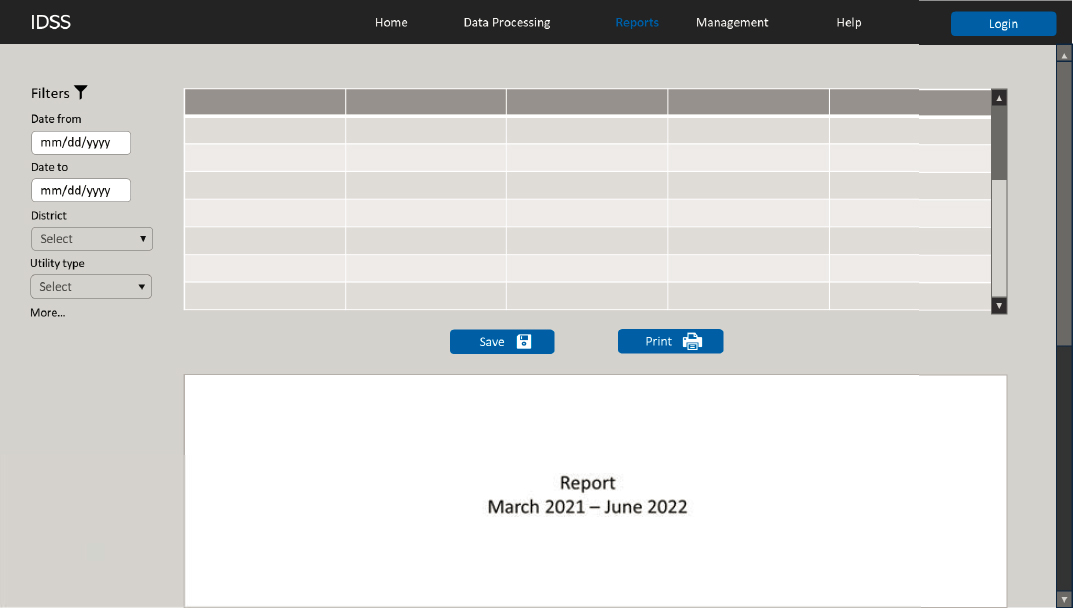
Figure 36 through Figure 39 show the following sample mockup pages of the user interface:
- Home. This page (Figure 36) includes a dashboard showing charts and tables illustrating UR change order trends. The dashboard enables users to apply relevant filters such as date range, utility type, and district.
- Data Processing. This page (Figure 37) enables users to import change order data from the PMS, classify the data using AI-based tools, and post-process UR change order data using spreadsheet-like tools, including sorting, filtering, and using color codes to
- highlight meaningful keywords (e.g., the terms shown in Table 43). The interface enables users to apply filters such as date range, utility type, and district.
- Reports. This page (Figure 38) enables users to generate reports, using relevant filters such as date range, utility type, and district. An implementation-level decision will be whether the Reports page should be a standalone page or integrated into the home page.
- Management. This page (Figure 39) enables users to manage various aspects of the IDSS, including user access levels, configuration settings, and notification settings. The level of user access to the various IDSS functions depends on user roles. For example, a manager would be able to view the dashboard, view and add comments to processed UR change order data, and generate reports. An authorized utility coordinator would be able to complete these activities as well as process and edit change order data. A visitor (e.g., a designer or other DOT users) would only have access to the dashboard. A designated user (e.g., a manager or an authorized utility coordinator) would be able to manage user access to the system.
The user interface includes a Help subsystem, which could be a standalone page or a tool that is integrated into the other pages.



IDSS Functions
A brief description of the IDSS functions shown in Figure 35 follows.
Data Import
The IDSS interacts with the PMS to extract change order data through an API and store the data in the IDSS database. An implementation decision will be whether the IDSS database should be stored in a separate database server or in a separate tablespace within the same database that stores the PMS data.
The IDSS extracts change order data from the PMS when a user executes the command to import data (Figure 37). An implementation decision will be whether importing data should be completed automatically without user intervention. Importing data automatically would also enable the IDSS to pre-process the data using AI-based tools automatically. However, it is not clear yet whether these potential benefits would translate into significant improvements in efficiency. First, importing change order data will probably remain a batch mode activity (e.g., once a month or once a quarter) when authorized users are interested in generating reports to examine UR change order trends. From this perspective, having the capability to import change order data in real time is low priority. Second, automating these steps would mean that authorized users have less control over the operation of the IDSS. AI is still relatively new, and it is critical to ensure that humans control AI implementations, not the other way around. As the level of comfort by users with AI tools increases over time, automating some functions will be viewed as a logical next step.
An implementation decision will be whether it is necessary to import the entire change order database or only certain data elements. Data elements the IDSS needs are as follows:
- District.
- Project number.
- Bid amount.
- Highway identifier.
- Change order number.
- Change order status.
- Approval date.
- Total change order amount.
- Change order justification.
- Change order reason codes.
- Change order description.
- Remarks/Notes/Comments.
General industry-standard requirements include the following:
- The web API should support secure, efficient data transmission operations.
- The imported change order data should be stored in a relational database that follows all relevant agency data standards, in particular those that deal with primary keys, foreign keys, and non-key attributes in tables, as well as those that deal with data modeling requirements.
- Users decide which date ranges to use and therefore the number of records to import. The data import process should be able to accommodate the entire dataset of change order records in the PMS.
Data Classification
The IDSS runs AI-based tools to classify change order data as UR or NUR depending on parameters the user specifies, such as data range, district, or utility type (Figure 37). As mentioned, the research team assumed that users would execute the command to run the AI tools manually (e.g., when it is necessary to generate reports).
Running the AI-based tools requires having trained, tested AI models loaded on the system. The task of training and testing AI models requires specialized software development skills, and it is best accomplished as a back-office activity outside the IDSS user interface. Major steps include data preprocessing, vectorization, training, and testing. Chapter 6 includes a detailed discussion of these steps as well as a discussion of the data and computer resources needed to train and test AI models. General requirements include the following:
- Sufficient computing power (including CPU, GPU, and memory) to handle the preprocessing, vectorization, and model training tasks efficiently.
- Adequate storage capacity to hold the labeled change order dataset, preprocessed data, trained models, and intermediate files.
- Programming environment with suitable languages (such as Python™) and open-source libraries (e.g., Pandas, TensorFlow, PyTorch, and scikit-learn) for AI model development, preprocessing, and training.
- Frameworks and platforms for training AI models, including those that support deep learning architectures.
- Reliable database to store and manage the change order dataset, AI model predictions, and labels.
Once the AI models are trained and tested, running them within the IDSS is usually fast and straightforward. All it takes is for an authorized user to click a button to run the command.
Post-Processing
After classifying change orders as UR or NUR, users post-process the data to verify or edit the AI-generated labels (Figure 37). Users can accept the AI-generated labels if they are correct or select the correct label if the AI-generated one is incorrect. Post-processing change order data usually includes the following activities:
- Load and, as needed, filter change order records according to criteria such as date range, district, utility type, project number, change order reason code, change order class label, change order amount, and additional construction time.
- Colorize records or meaningful keywords (e.g., the terms shown in Table 43). This activity includes selecting keywords to highlight on the screen depending on factors such as the prediction power of the keyword or the user’s desire to focus on certain keywords or topics. As an example, Figure 34 shows the result of colorizing a few keywords, some in red and some in blue to highlight specific aspects of the change order descriptions.
- Accept the AI-generated labels or make corrections.
- Update change order entries in the IDSS database.
- Flag change order records and share them with different stakeholders if additional information is needed.
Colorizing keywords in Chapter 6 was a manual process, involving colorizing one keyword at a time. For the IDSS implementation, a more effective approach would be to have a tool that displays all the keywords at once (e.g., using the list in Table 43) and asking authorized users to select a color for each keyword they would like to highlight. For example, as shown in Figure 40, the user would select blue for waterline, red for electric, green for manhole, and orange for valve. After applying these colors, the description for all the change orders displayed on the screen would show these keywords in the corresponding color selected by the user.

Managing the keyword color table could be implemented at the IDSS level while giving users the capability to customize colors as needed. To ensure compliance with Section 508 requirements, a recommendation is to provide alternative highlighting options that do not depend on color (109). Examples include showing text in bold or italics, underlining text, and drawing rectangles around keywords.
General requirements to implement post-processing within the IDSS include the following:
- User-friendly interface allowing easy selection and filtering of change order records based on specified categories.
- Scalability to ensure acceptable levels of system performance regardless of the number of records loaded on the screen.
- Mechanism to allow users to accept AI-generated labels or enter corrections.
- Storage of both AI-generated labels and user corrections in the database for quality control and tracking purposes.
- Clear presentation of change order records with relevant categories for easy assessment.
- User authentication to ensure that only authorized users can access and modify labels.
Dashboard and Reports
The IDSS enables users to customize the dashboard and change parameters as needed to generate reports (Figure 36 and Figure 38). The interface enables users to change criteria such as date ranges, district, and utility type. Examples of dashboard options the IDSS supports include, but are not limited to the following:
- Distribution of UR and NUR records,
- Change order records per year or quarter (frequency customization),
- Change order distribution across utility types,
- Top ten keywords influencing change order class detection and their predictive power,
- Total change order amount per year or quarter,
- Change order classification according to user-defined subcategories.
Reports can be customized using similar criteria, except that results can also be shown in a tabular format.
Figure 41 and Figure 42 show examples of charts that can be presented in the dashboard. Figure 43 shows an example of how these charts could be included in the home page of the IDSS.


Notifications
The IDSS notification function enables users to flag a change order record and notify stakeholders directly within the IDSS user interface. The notification system also sends alerts to corresponding users for tasks, such as notifying users when the AI model training or prediction is complete, when the request for a new account is approved, or when a report is shared with a stakeholder.
System Management
The IDSS enables users to manage various aspects of the IDSS, including user access levels, configuration settings, and notification settings (Figure 39). The level of user access to the various IDSS functions depends on user roles. Users with administrative access to assign different roles to individual users. Authorized users can classify data and post-process change order records. Other users can view and customize their dashboard, flag records, and generate reports.


