The Business Case for Knowledge Management: A Guide (2026)
Chapter: 4 Technology for KM Solutions

CHAPTER 4
Technology for KM Solutions
IT is playing an ever-increasing role in KM solutions. In this chapter, the types of technologies incorporated into KM solutions are introduced, and vendor pricing and deployment options for software products are described.
Please note that this chapter does not provide specific technology recommendations. First, the technology landscape is constantly evolving, meaning that any recommended solutions could quickly become outdated. Second, the effectiveness of any specific technology solution is highly dependent on various factors that cannot be fully addressed here, for example, a state DOTʼs existing technology infrastructure and legacy systems, IT strategy, success with systems deployments, and organizational culture.
4.1 KM Software Categories
Thousands of commercial software products exist that perform one or more KM functions. The following list provides more than 40 categories of KM-related software products, presented in 10 groups, each with a one-sentence narrative description about its primary use.
Content and Document Management
- Document management systems (DMSs). Organizing, storing, and retrieving documents.
- Digital asset management (DAM). Managing digital assets such as plan sheets, images, videos, and audio files.
- CMSs. Creating, managing, and publishing content on websites or intranets.
- Records management systems. Managing official records and ensuring compliance with legal and regulatory requirements.
- Enterprise content management (ECM). Managing content across an organization, including data, documents, records, and digital assets.
Collaboration and Communication
- Collaboration platforms. Enabling teams to work together on projects, share files, and communicate effectively.
- Social collaboration tools. Creating internal social networks for knowledge sharing and community building.
- Messaging and chat apps. Facilitating real-time communication and collaboration.
- Video conferencing tools. Enabling remote meetings and collaboration.
- Project management tools. Planning, organizing, and managing projects.
Knowledge Capture and Organization
- Knowledge base software. Creating and managing centralized knowledge bases.
- Taxonomy and ontology management. Organizing knowledge using hierarchical structures and relationships.
- Tagging and metadata management. Applying metadata to content for easier search and retrieval.
- Content curation. Selecting, organizing, and presenting relevant content.
- Content syndication. Distributing content to multiple channels or platforms.
Search and Retrieval
- Enterprise search. Searching for information across multiple systems and repositories.
- Semantic search. Using natural language processing to understand search queries and return relevant results.
Knowledge Sharing and Dissemination
- Intranets and extranets. Creating internal and external portals for knowledge sharing.
- CoPs. Fostering collaboration and knowledge sharing among groups with common interests.
- Knowledge portals. Providing a centralized hub for accessing and sharing knowledge.
- Knowledge graphs. Representing relationships between entities and concepts.
- Microlearning platforms. Delivering small, focused learning modules.
Knowledge Analytics and Insights
- Text analytics. Analyzing text data to extract insights, identify trends, and understand sentiment.
- Social media analytics. Analyzing social media data to understand public opinion and trends.
- Web analytics. Tracking website usage and user behavior.
- Predictive analytics. Using data to predict future trends and outcomes.
- Prescriptive analytics. Suggesting actions based on data analysis and predictions.
Learning and Development
- Learning management systems. Delivering online courses and training materials.
- Performance management systems. Tracking employee performance and providing feedback.
- Talent management systems. Managing the entire employee life cycle, from recruitment to retirement.
- Corporate universities. Providing internal training and development programs.
- Microlearning platforms. Delivering small, focused learning modules.
Governance, Risk Management, Compliance, Information Security, and Data Privacy
- Compliance management systems. Ensuring compliance with regulations and standards.
- Risk management tools. Identifying, assessing, and mitigating risks.
- Governance, risk, and compliance platforms. Integrating governance, risk, and compliance processes.
- Data loss prevention tools. Protecting sensitive data from unauthorized access or disclosure.
- Information rights management. Controlling access to and usage of digital information.
- Encryption tools. Protecting data from unauthorized access by encrypting it.
Business Intelligence and Analytics
- Business intelligence (BI) tools. Analyzing data to make informed business decisions.
- Data visualization tools. Creating visual representations of data to make it easier to understand.
- Data warehousing and data lakes. Storing and managing large volumes of data.
AI and Machine Learning
- Natural language processing (NLP). Analyzing and understanding human language.
- Machine learning platforms. Building and deploying machine learning models for various tasks, such as recommendation engines and predictive analytics.
- Chatbots and virtual assistants. Providing automated customer service and support.
- Generative AI. Creating original content and solving complex problems by leveraging learned patterns from vast amounts of existing data.
Please note that the names of these categories continually change as new technologies are introduced on the market.
4.2 Software Vendor Pricing and Deployment Options
When assessing a technology solution for a state DOT KM initiative, one important consideration is the vendorsʼ pricing models, which can substantially influence the overall cost of the solution implementation. In this section, several standard vendor pricing models are listed, and the types of costs associated with software implementation are discussed.
4.2.1 Pricing Models
The most common types of pricing models for commercial software are as follows:
- Pricing per named user. This is a popular pricing model for KM solutions where the cost of the KM software is based on the number of users who access and operate the system. A “user” profile can differ between vendors, but usually involves full-time staff, management, consultants, contractors, and possibly external users from partner organizations. The total cost is determined by multiplying the number of users by the per-user fee, and discounts may apply based on high volumes. Per-user pricing is an easy to understand, simple model that can scale based on the number of user changes.
- Pricing per seat. This is also a popular pricing model used in KM solutions where the cost is based on the number of seats or licenses allocated to users. A “seat,” for most vendors, typically represents a user who has access to the KM solution and can utilize its features. The total cost is determined by multiplying the number of seats by the per-seat fee, and discounts may apply for high volumes. Similar to per-user pricing, the features and functionality of the KM solution can affect the vendorʼs pricing strategy. It is a simple and easy to understand pricing model, and the cost can adapt as the number of seats changes. In most cases, one seat
refers to one individual—a “named” seat. However, some models allow individuals to share (e.g., a department seat that multiple people can use, but not at the same time).
- Usage-based pricing. This KM solution pricing model differs from models one and two, where cost is calculated based on system usage, and organizations pay only for the resources they consume rather than a fixed fee or per-user/seat cost. The total price is established by multiplying the usage metrics by the corresponding rates that may differ between vendors, and discounts may apply for high volumes. Some metrics used to derive cost can include, but are not limited to, the number of documents uploaded or downloaded, the number of searches and queries performed, storage space used, and the number of application programming interface request calls.
- Pricing per document. This pricing model is similar to usage-based pricing, but in this model, vendors charge a cost based on the number of documents stored or accessed in the KM system, and discounts may apply for high volumes. This model can be more economical for organizations with a high volume of documents.
- One-time/small-scale pricing. This project-based pricing model is most suitable for one-time small projects, such as pilots and prototypes. In this model, vendors charge a fixed fee for a specific KM initiative project, such as implementation or customization. However, this model may not provide ongoing support or maintenance.
4.2.2 Software License and Implementation Costs
The direct costs associated with a state DOT KM solution vary depending on several critical factors influenced by the vendorʼs pricing strategy and models. Key factors that affect direct costs include the size, scope, and complexity of the KM solution, covering all business requirements and including the associated software features and functions. The indirect costs that affect pricing are data migration and integration, the implementation and deployment of the KM solution, and the chosen deployment method (on-premises, cloud, or hybrid). Finally, vendor services, support, ongoing maintenance, updates, and training needs can impact the overall pricing. The KM business team needs to carefully consider these factors to make informed decisions when evaluating vendor offerings and negotiating pricing.
4.2.2.1 Deployment Model 1: On-Premises
In the on-premises deployment model, the KM solution is installed and operated on the clientʼs site/on-premises. This usually involves a one-time up-front cost for the first year that includes the perpetual (permanent) license, allowing for unlimited use, maintenance, and support services. For subsequent years, the client only pays maintenance and support fees, usually a percentage of the perpetual license (for example, 20 or 30 percent). This type of deployment model sometimes leads to additional hardware costs or an increase in infrastructure capacity. When considering an on-premises KM solution, breaking down the direct and indirect costs into various components is essential to understanding the total cost. Table 23 details the critical elements of the KM solution and their direct and indirect costs.
4.2.2.2 Deployment Model 2: Cloud-Based
Cloud-based deployment models are usually based on a subscription with recurring monthly or annual fees based on the number of users or storage capacity. Cloud-based technology solutions offer a subscription-based model, where organizations make recurring payments to access the software and its services. Cloud-based deployment models offer flexible scalability that adjusts the KM solution resources based on dynamic and changing needs.
Cloud-based systems are usually more cost-effective due to no up-front hardware or software investments. Users benefit from global access to the KM solution from anywhere with an internet connection, and vendors typically handle maintenance and updates. Table 24 details the critical elements of the KM solution and their direct and indirect costs.

Long Description.
The table is divided into two sections. The top section is titled Direct Costs. The table consists of two rows, with each row having sub-rows. The data given in the table row-wise are as follows: Row 1, Hardware: Servers: Extra servers may be required to provide sufficient computational processing power, processing cores, and memory to handle the expected workload; Storage: Depending on the data volume of the use case there may be a requirement for additional storage devices; Networking equipment: Depending on the extra capacity and load demands of the KM solution, there may be a requirement for additional routers, switches, and firewalls necessary for connecting the KM system to the network. Row 2, Software: KM software license: The primary cost, this includes the software itself and any required modules or add-ons; Function and Features: The complexity and sophistication of the KM solution affect costs; Database software: A database is typically required to store and manage the KM data (this could be a relational, no-SQL, triple store or graph database); Maintenance and support: Contracts for ongoing maintenance, updates, and technical support. The first year is usually part of the perpetual license fee (requires vendor confirmation), and subsequent years are a percentage of the perpetual fee; Scalability: The number of users, data volume, and usage demands will influence costs. Bottom section is titled Indirect Costs. The table consists of three rows, with each row having sub-rows. The data given in the table row-wise are as follows: Row 1, Implementation: Professional services: Consultants or system integrators may be needed to assist with installation, configuration, or documentation. Row 2, Ongoing: Hardware and software upgrades: Periodic upgrades to keep the system up-to-date and secure; Energy consumption: The cost of powering IT infrastructure where the KM solution resides; Facility costs: Costs associated with housing the hardware, such as rent, cooling, fire suppression, and security. Row 3, Supplementals: Customization: Special customization of the KM solution and associated peripheral enterprise system can increase costs; Data migration: Moving existing data from enterprise systems (ERP, CRM, and DAM) and other systems to the KM solution can increase costs; Training: Training for end-users and administrators to ensure proper usage and operation of the KM solution; Integration: Integrating the KM solution and associated peripheral enterprise system can increase costs; Security: Implementing robust security measures to protect sensitive data.
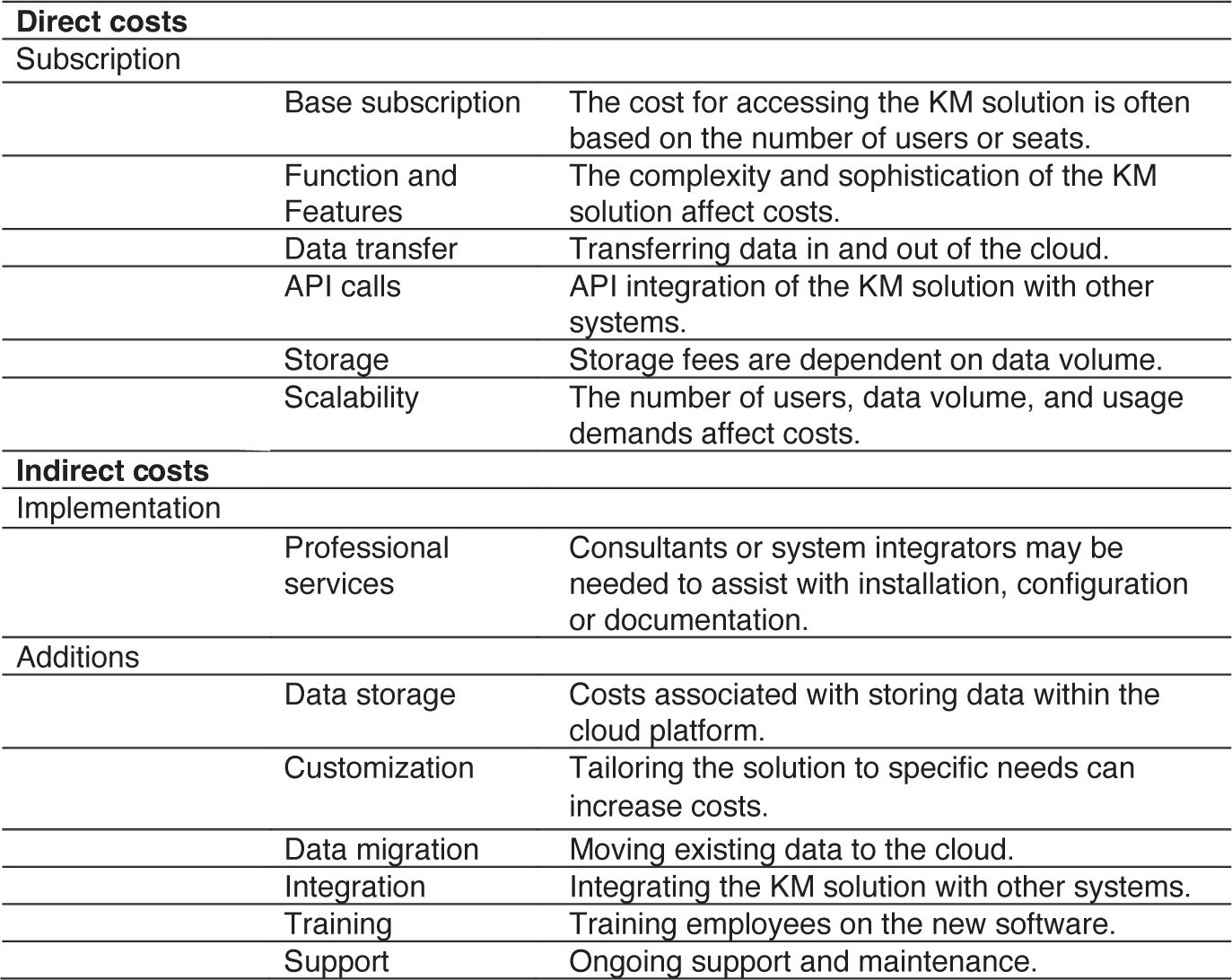
Long Description.
The table is divided into two sections. The top section is titled Direct Costs. The table consists of one row with six sub-rows. The data given in table row-wise are as follows: Subscription: Base subscription: The cost for accessing the KM solution is often based on the number of users or seats; Function and Features: The complexity and sophistication of the KM solution affect costs; Data transfer: Transferring data in and out of the cloud; API calls: API integration of the KM solution with other systems; Storage: Storage fees are dependent on data volumes; Scalability: The number of users, data volume, and usage demands affect costs. Bottom section is titled Indirect Costs. The table consists of two rows, with each row having sub-rows. The data given in the table row-wise are as follows: Row 1, Implementation: Professional services: Consultants or system integrators may be needed to assist with installation, configuration, or documentation. Row 2, Additions: Data storage: Costs associated with storing data within the cloud platform; Customization: Tailoring the solution to specific needs can increase costs; Data migration: Moving existing data to the cloud; Integration: Integrating the KM solution with other systems; Training: Training employees on the new software; Support: Ongoing support and maintenance.
4.2.2.3 Deployment Model 3: Hybrid-Based
A hybrid cloud model combines the advantages of both on-premises and public/private clouds. Organizations sometimes must distribute the KM solution on-site and across one or multiple cloud environments. This is important as it provides flexibility and scalability while maintaining control over sensitive information. Some specific issues need to be considered for a hybrid environment, such as ensuring secure and reliable communication between on-premises and cloud environments, managing and coordinating the workload distribution between on-premises and cloud resources, and implementing robust security measures to protect data across both environments. Refer to Tables 24 and 25 for the breakdown of direct and indirect costs for the hybrid deployment model.
4.3 KM Use Cases
A use case is a narrative description of how a system or application is used by an actor to achieve a specific goal. It outlines the steps involved in a userʼs interaction with the system and the expected outcomes.
Key components of a use case include:
- Actor. The entity that interacts with the system, such as a person, another system, or a hardware device.
- Goal. The objective that the actor wants to achieve through their interaction with the system.
- Preconditions. The conditions that must be met before the use case can begin.
- Postconditions. The conditions that will be true after the use case is completed.
- Steps. The sequence of actions performed by the actor and the system to achieve the goal.
- Alternative flows. Possible variations or exceptions that may occur during the use case.
Use cases are commonly used in software development to capture the functional requirements of a system and to guide the design and development process. They can also be used to communicate the systemʼs functionality to stakeholders.
The document containing functional or business requirements is typically a business requirements document (BRD) or functional requirements document (FRD). The BRD tends to be higher-level, focusing on business objectives and needs, while the FRD provides more detailed specifications of how the system should function from a user perspective. The key differences are that the BRD answers “what” the business needs and why, while the FRD details “how” the system should work from a user perspective.
Use cases are typically presented in the FRD, as they describe how users will interact with the system to accomplish specific tasks or goals.
4.4 Technical Requirements for KM Solutions
When investigating software for your organization, understanding and documenting technical requirements is also crucial for success. This section will help guide you through the process of identifying, collecting, and documenting these requirements, even if you do not have a deep technical background.
Technical requirements are the specific conditions and capabilities that a software system must meet to function properly within your organizationʼs environment. Think of them as the “behind-the-scenes” specifications that ensure the software will work as intended. These requirements go beyond the features you want (functional requirements) to include the technical infrastructure and conditions needed to support those features.
Common categories of technical requirements include:
- Hardware specifications (e.g., processors, memory, storage).
- Operating system compatibility.
- Network requirements and bandwidth needs.
- Security requirements.
- Integration requirements with existing systems.
- Data storage and backup needs.
- User access and authentication requirements.
- Performance requirements (e.g., speed, response time).
- Browser compatibility (for web-based applications).
- Mobile device support specifications.
Understanding and documenting technical requirements is crucial for several reasons:
- Better vendor communication. Well-documented requirements help software vendors understand your needs and propose appropriate solutions. This reduces misunderstandings and helps ensure you get accurate pricing quotes.
- Ensuring smooth implementation. Clear technical requirements help identify potential challenges before they become problems. This results in better project planning and resource allocation.
- Avoiding costly mistakes. Discovering technical incompatibilities after purchasing software can lead to significant additional expenses or even project failure. For example, finding out that a new system requires more powerful servers than you currently have can result in unexpected hardware costs.
- Future planning. Technical requirements documentation serves as a reference for future upgrades, maintenance, and system changes. It helps your IT team plan for necessary infrastructure updates and budget accordingly.
Collecting technical requirements involves gathering information from various stakeholders and sources. A structured approach is as follows:
- Engage key stakeholders.
- The IT department or support understands your current technical infrastructure.
- End users know how the system needs to perform.
- Business process owners understand workflow requirements.
- The security team can specify security requirements.
- The finance team can provide budget constraints.
- Ask the right questions.
- What systems does the new software need to work with?
- How many users will access the system simultaneously?
- What type of data will be stored and processed?
- What are the security and compliance requirements?
- What are the performance expectations?
- Where and how will users access the system?
- Review the existing infrastructure.
- Document current hardware specifications.
- Map out network capabilities.
- List existing software systems that need integration.
- Identify any technical limitations or constraints.
- Consider future needs.
- Anticipate user growth.
- Plan system upgrades.
- Consider future integration requirements.
- Consider scalability needs.
Effective documentation of technical requirements should be clear, organized, and accessible to both technical and non-technical stakeholders.
While practices can vary by organization, the document containing technical requirements is typically a technical requirements specification or technical requirements document. Sometimes it may be part of a larger software requirements specification with separate sections for business, functional, and technical requirements.
4.5 KM and Artificial Intelligence
The AI field has been moving at light speed since the public introduction of ChatGPT in November 2022. As of 2024, global investment in AI is substantial and continues to grow rapidly. While precise figures can vary depending on the sources and methodologies used, estimates suggest that trillions of dollars are being invested in AI research, development, and deployment. The pace of investment has accelerated significantly in recent years, and it is expected to continue growing as AI technologies become even more pervasive.
KM and AI are closely interrelated fields that increasingly complement each other. There are four key areas of intersection.
- Knowledge representation:
- KM focuses on capturing and organizing human knowledge in structured ways.
- AI systems need this structured knowledge to function effectively.
- Both fields deal with converting tacit knowledge (in the minds of employees) to explicit knowledge (documented/coded form).
- Information processing:
- KM provides the framework for organizing and categorizing information.
- AI provides tools to process and analyze this information at scale.
- Together, they help extract meaningful insights from large datasets.
- Decision support:
- KM provides the business context and rules for decision-making.
- AI provides the computational power and algorithms to apply these rules.
- Combined, they enable more informed and faster decision-making.
- Learning and improvement:
- KM captures lessons learned and best practices.
- AI can identify patterns and generate new insights from this knowledge.
- Both fields focus on continuous improvement and adaptation.
State DOTs have an interest in using AI to improve their performance. Unfortunately, many DOTs operate in an environment with stretched IT budgets and IT staff without the necessary capabilities. The best approach to adopting AI, including large language models (LLMs), is to start small with readily available, commercial solutions. A practical approach could include:
- Begin with software as a service solutions.
- Use existing AI-powered business tools that require minimal technical setup.
- Examples: Microsoft 365 Copilot, Google Workspace AI features, or Salesforce Einstein.
- These integrate AI capabilities into familiar tools your team already uses.
- Focus on clear business problems.
- Start with specific, well-defined challenges rather than broad implementations.
- Examples include customer service automation, document summarization, basic content creation, email management, and meeting summaries.
- Use enterprise-grade LLM services.
- Choose established platforms with business-level security and support.
- Options include ChatGPT Enterprise, Claude (via Anthropic), Microsoft Azure OpenAI Service, and Googleʼs Duet AI.
- These provide more security and privacy than consumer versions.
- Establish clear guidelines.
- Create usage policies and guidelines.
- Define what types of data can and cannot be input into AI tools.
- Train employees in proper use and limitations.
- Monitor and document usage and outcomes.
- Start with low-risk applications.
- Begin with internal, non-critical processes.
- Avoid using AI for sensitive data or critical decisions initially.
- Always maintain human oversight.
Some potential first projects could include document summarization, meeting note generation, basic customer frequently asked question responses, internal knowledge base search enhancement, and template creation for routine documents.
Consider the following key factors to ensure that the chosen solution aligns with your business goals and operational needs when evaluating AI tools for your organization. Taking these factors into account will help you choose an AI tool that not only fits your organizationʼs needs but is also secure, compliant, and capable of providing measurable value:
- Integration with existing systems. Ensure the AI solution can integrate seamlessly with your current software, data sources, and workflows to avoid disruption and maximize utility.
- Data requirements and data quality. AI performance relies on the quality and quantity of data. Assess whether your organization has access to the necessary data and whether it is clean, structured, and representative for accurate AI predictions.
- Security and compliance. Given the sensitivity of data, prioritize tools that adhere to data security standards and compliance regulations relevant to your industry. Make sure to understand your organizationʼs AI use policy.
- Ease of use and user training. Select tools with user-friendly interfaces and consider the level of training required for adoption. Assess the learning curve for end users and whether support resources or training materials are available.
- Vendor reliability and support. Evaluate the vendorʼs track record, longevity, and support capabilities. Quality customer support, regular updates, and prompt troubleshooting are critical to maintaining tool functionality.
- Performance and accuracy. Check the AIʼs accuracy in making predictions or decisions. Look for performance metrics, case studies, or pilot results that align with your organizational needs and accuracy expectations.
- Ethics and transparency. Verify the ethical use of AI, including transparency in decision-making processes, the ability to interpret AI recommendations, and mechanisms to mitigate bias.
- Scalability and flexibility. Choose an AI tool that can grow with your needs, adapting to increased data volume, additional users, and expanding functionality. It should also support integration with other tools in your tech stack.
- Cost of ownership. Consider both up-front and ongoing costs, including licensing, implementation, maintenance, and scaling expenses. Conduct a cost-benefit analysis to ensure ROI.
Last, a note of caution. Overreliance on AI systems, particularly considering hallucinations and faulty data or training models, poses significant risks to businesses and individuals alike. AI hallucinations, which are incorrect or misleading results generated by AI models, can stem from several factors, such as insufficient or biased training data, overfitting, and limitations in AI architectures. These hallucinations can lead to the perpetuation of biases, erosion of trust in AI technologies, and potentially severe consequences when relied upon for critical decision-making.
To mitigate these risks, it is crucial to approach AI-generated content with a critical eye and never use it as a final authority. Instead, users should implement a multifaceted verification process. This can include comparing AI outputs with insights from domain experts, re-running queries to check for consistency, and utilizing multiple AI tools to cross-reference the results. Additionally, it is essential to be aware of potential biases in AI systems and regularly evaluate the quality and diversity of training data. By incorporating these practices and maintaining human oversight, organizations can harness the benefits of AI while minimizing the dangers associated with hallucinations and faulty models, ensuring more accurate and reliable outcomes.
4.6 Requesting a Vendorʼs Help with Pricing
To obtain product pricing for preparing your KM business case, the research team suggests contacting software vendors directly. Vendors have developed pricing strategies that can provide tailored pricing and licensing terms based on your business requirements. Other sources that provide information on software product pricing are industry reports, research papers, and software product websites. These sources may also publish information on software trends and provide other valuable insights. Some of these reports may require purchase and subsequent validation of the information by the actual vendors.
Depending on your evaluation stage, you can request different types of pricing estimates:
- Rough order of magnitude (ROM) estimates. These are ballpark (rough) estimates, normally based on general information about the type and size of the organization, the high-level needs, and the industry in which you operate. ROM estimates are helpful for initial budgeting and feasibility assessments and can vary from 10 to 30 percent lower than the full detailed pricing to be used as a rough guideline. The actual difference can be more or less, depending on the specific circumstances.
- Published vendor price lists. These prices are provided on a vendor-published list (brochure, website) of pricing options for different components of a KM solution. It can include costs beyond the software licenses, such as hardware components (e.g., processing cores), implementation services, training, and support. These estimates are specific and closer to the full detailed pricing than ROM estimates, but may still require KM solution customization requirements to provide exact pricing.
- Full detailed pricing. This pricing level consists of a comprehensive breakdown of all costs associated with the KM solution, tailored to the specific business requirements of the state DOT organizationʼs KM initiative. It is based on a thorough assessment of the organizationʼs needs, the integration and implementation cost to fit as part of existing infrastructure, and a capacity planning perspective, such as usage volume, often called volumetrics (number of users, data volumes, transactions/period). This pricing model is considered the most accurate as it reflects all relevant components, customization needs, and other technological and implementation factors.
4.7 Getting Help from Your IT Staff
If you are preparing a business case for a KM solution and it involves the purchase and implementation of one or more software products, the research team suggests getting an IT staff member involved as early as possible. They will help you prepare your KM use cases, define your solution requirements, identify possible software products, and assist you with product evaluations.
Capterra offers an excellent online article titled “How To Make A Strong Business Case For Software Purchases” (https://www.capterra.com/resources/sample-business-case-for-software-purchases/) that could be helpful if you are recommending software products as part of your KM solution.


